
AUTOGAIN
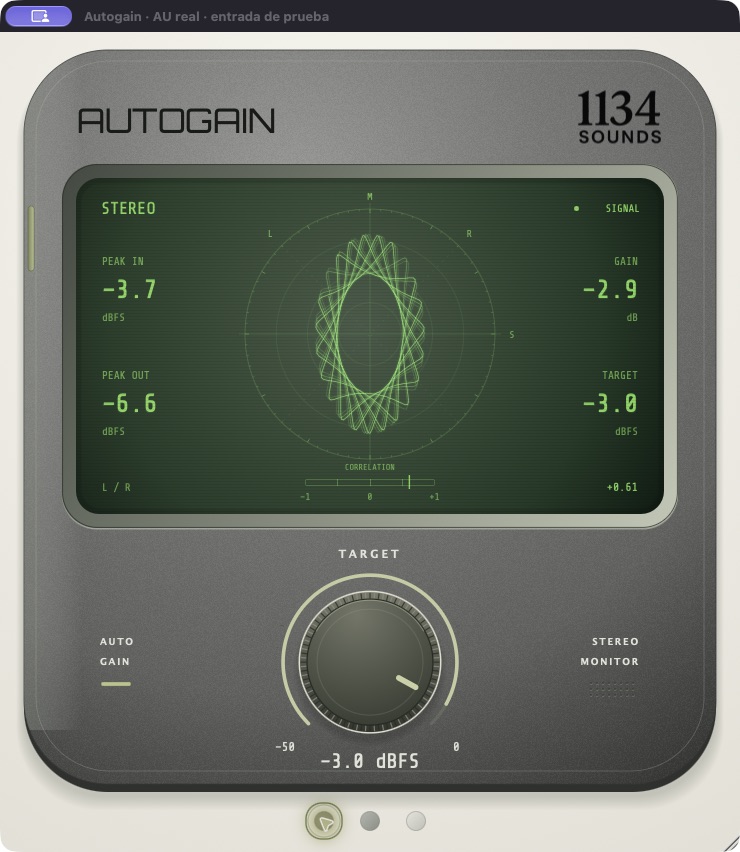
One target. A clear view.
Automatic sample-peak gain adjustment with one continuous audio control. Set the output target, then watch the input, output and stereo relationship in the radar display.
Target. One continuous control.
Set a sample-peak target between −50 and 0 dBFS. The initial setting is −3 dBFS. The current engine adjusts gain so output samples stay within that ceiling; this is a peak target rather than a LUFS loudness target.
Fast reduction. Gradual recovery.
Gain drops immediately when a processing block needs it and returns gradually. The output can remain below Target while it recovers. Both channels share the same gain factor, preserving their level relationship.
See what changes.
Peak In, Peak Out and Gain show the incoming level, outgoing level and applied adjustment. The radar draws the real output's stereo relationship, while the correlation display gives another view of the relationship between left and right.
A finish of your own.
Choose dark, medium or white casing. The appearance is saved with the plugin state, along with Target. Bypass is available through the host.
Read the signal as you set the level.
- Insert the development plugin on a mono or stereo audio path.
- Choose the sample-peak target with the Target control.
- Watch Peak In, Peak Out and Gain while listening to the result.
- Use the host's bypass to compare with the original signal.
Where it stands.
The native prototype is in testing. It is not a LUFS normalizer or a true-peak limiter and does not promise protection from intersample peaks. Public installers and final compatibility requirements have not been announced.